McZeal Robotics Drag & Drop Robot Programming Portal™
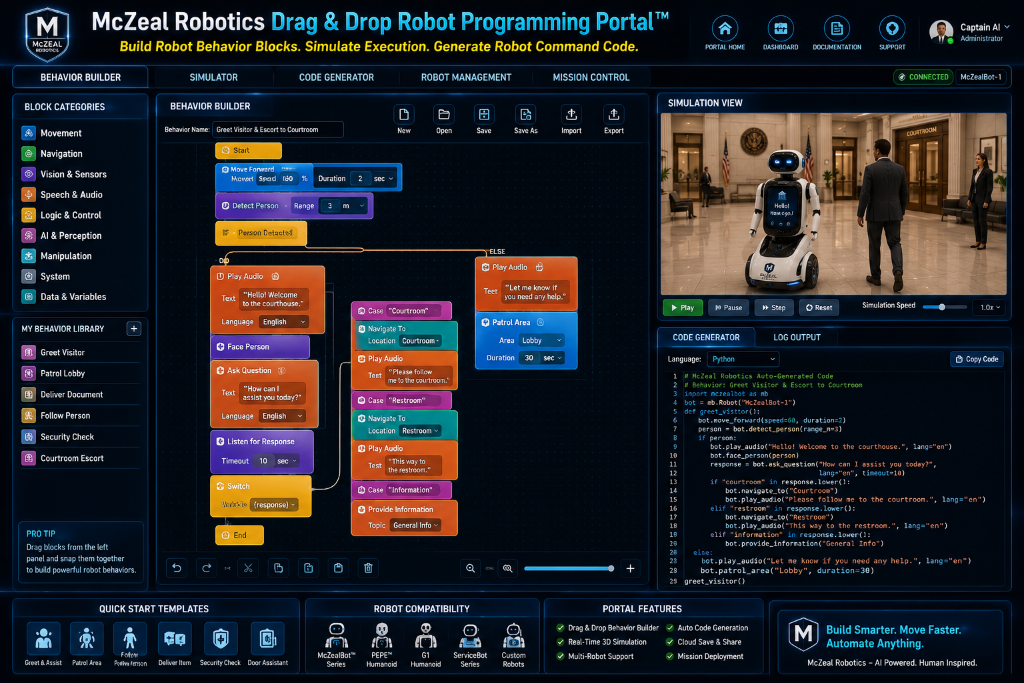
Build Robot Behaviors. Simulate Execution. Generate Robot Command Code. The McZeal Robotics Drag & Drop Robot Programming Portal™ is a visual robot development environment that helps organizations create, test, deploy, and manage autonomous robot behaviors without requiring advanced programming knowledge.
Designed for businesses, schools, law firms, healthcare providers, government agencies, public safety organizations, and robotics developers, the portal reduces the time and technical expertise required to deploy autonomous robots into real-world operations.
New Platform Feature
McZeal Robotics Humanoid Imagination Studio™
A new flagship platform page now highlights McZeal Robotics’ vision for natural-language robot creation, simulation, safety validation, and universal robot application deployment.
Build robot workflows with drag-and-drop behavior blocks
Users can assemble intelligent robot actions, customer interactions, patrol routines, visitor workflows, delivery tasks, telepresence sessions, security procedures, educational lessons, and business automation flows by dragging blocks into a visual workspace.
Real-time robot simulation before deployment
Every workflow can be previewed and tested in simulation mode before it reaches a live robot, helping teams validate motion, responses, routing, and operational procedures.
Visual workflows with code output for technical teams
As workflows are created visually, the platform can support command and script generation so beginner-friendly design and advanced developer workflows can live in the same environment.
Deploy one robot or thousands from one platform
The portal supports single robot operation, fleet-wide rollout, reusable behavior libraries, mission scheduling, and centralized enterprise oversight.
Configure advanced AI-driven robot experiences
The platform is designed to connect visual robot workflows with voice, language, vision, document intelligence, and decision-support capabilities for real-world automation.
Pre-built templates for real-world deployments
Templates help organizations accelerate robot rollout across legal, education, healthcare, public safety, and government use cases.
Why organizations use the Drag & Drop Portal
Visual programming helps teams deploy faster, train staff more easily, scale across locations, and maintain centralized control of robot operations.
Launch training from operator basics to commercial robot deployment
Explore certification paths, specialized industry tracks, Kids & Robots™, and the flagship McZeal U-ROS™ academy program.
Pepper robot video
Watch Pepper in action directly from the portal.
LeLe delivery robot video
Watch the LeLe delivery robot in action directly from the portal.
Unitree Humanoid Deployment Advisor™
Discover how a humanoid robot can work inside your business, office, hotel, school, dealership, law firm, security company, museum, or public facility.
This dashboard combines McZeal deployment planning with Unitree-style humanoid flexibility, including SDK-ready workflows, optional dexterous hands, AI-driven autonomy concepts, and role-based business deployment templates.
Business Type Selector
Choose the business environment you want to plan for.
Needs Assessment Form
Tell the advisor what you want the robot to do inside your business.
Deployment Templates
Start with a preset McZeal Robotics deployment concept.
Expand patrol coverage, improve response time, and document incidents with fewer overnight staffing gaps.
Improve guest assistance after hours, reduce repetitive front-desk load, and strengthen hallway patrol coverage.
Capture more showroom leads, greet walk-ins faster, and extend product explanations without adding floor staff.
Reduce receptionist overload, speed up client intake, and support secure telepresence meetings and office monitoring.
Enhance STEM engagement, support classroom demos, and deliver robotics experiences across multiple groups.
Deliver consistent guided tours, answer visitor questions, and create a standout interactive attraction.
Improve customer greeting, guide shoppers faster, and support shelf checks without pulling staff from sales.
Increase facility patrol visibility, improve visitor directions, and support remote intervention in sensitive buildings.
Recommended Deployment
Law Office Robot Assistant
Deploy a Unitree humanoid solution for Law Office using a McZeal-configured workflow stack. The recommended plan combines legal package capabilities with Unitree G1-style developer flexibility, including SDK-based integrations, dexterous hand options where needed, and AI-driven autonomy for repetitive business operations.
Suggested Robot Name
McZeal deployment concept
McZeal Law Office Robot Assistant
Recommended Service Package
Suggested software package
Legal Package — Brain Train™, intake, case lookup, document workflow, and office management.
Best Use Cases
Where this humanoid robot fits best
- • Front-desk greeting and guided visitor assistance
- • Visible patrol presence with live escalation support
- • Remote expert, manager, or attorney telepresence sessions
Daily Robot Workflow
A sample day in operation
- • Opening shift: McZeal Law Office Robot Assistant boots, checks battery, verifies connectivity, and loads the Law Office task profile.
- • Morning operations: handles customer service, telepresence, security while greeting visitors and routing exceptions to staff.
- • Midday coverage: follows voice interaction, ai chatbot, live video, remote control workflows and logs interactions for reporting.
- • Afternoon escalation: supports supervisors with telepresence, alerts, or remote operator assistance when higher-touch tasks appear.
- • End-of-day wrap-up: returns to dock, syncs activity logs, and sends a deployment summary to the McZeal command dashboard.
- • Template focus: Law Office Robot Assistant.
Needed Software Modules
Recommended deployment software stack
- • Brain Train™
- • Client Intake
- • Case Lookup
- • Document Workflow
- • Office Management
- • Visitor Greeting Flow
- • Queue Routing
- • FAQ Voice Layer
- • Remote Operator Session
- • Live Call Launcher
- • Security Patrol Logic
- • Threat Escalation Rules
- • Voice AI
- • AI Chatbot Layer
- • Live Video Monitoring
- • Remote Override Console
Required Hardware Accessories
Suggested accessories and hardware add-ons
- • Unitree G1 humanoid platform review
- • HD live video camera stack
- • Remote operator control station
- • Body-worn lighting and audible alert package
- • Autonomous charging dock
- • Edge AI compute module
- • Unitree SDK integration toolkit for G1/H1 workflows
Safety and Compliance Checklist
Before any live deployment
- • Site walk-through and hazard map approval before deployment
- • Clearly marked human takeover and emergency stop procedures
- • Restricted zones and speed limits configured by area
- • Staff training for daily supervision and escalation handling
- • Privacy, signage, and camera retention policy review
- • Incident response chain and alert recipient list approved
Estimated Business Benefits
Estimated staffing savings: about 63 labor hours per week (1.6 FTE-equivalent capacity).
- • Estimated staffing savings: about 63 labor hours per week (1.6 FTE-equivalent capacity).
- • Faster response times for repetitive visitor-facing or patrol tasks.
- • Higher service consistency across long operating windows.
- • Stronger brand differentiation through visible robotics deployment.
Suggested Implementation Timeline
Recommended rollout sequence
- • Phase 1 — Discovery and facility assessment (Week 1)
- • Phase 2 — Software configuration, workflows, and safety mapping (Weeks 2–3)
- • Phase 3 — Pilot deployment and supervised live operations (Weeks 4–5)
- • Phase 4 — Staff training, optimization, and support launch (Week 6)
Proposal Generator
Create a proposal summary your team can review or send internally.

